

So, you’ve heard about Fiverr and are curious how to get started? You're in the right place! Registering for a Fiverr account is straightforward and opens up a world of freelance opportunities, whether you're looking to offer your services or hire talented individuals. This step-by-step guide will walk you through the process, making it easy to join this vibrant platform. Let’s jump right in!
Why Choose Fiverr?
Fiverr has carved out a significant niche in the freelancing world, and for good reasons! Here’s why it might just be the perfect platform for you.
- Diverse Services: From graphic designing to writing to programming, Fiverr covers nearly every freelance service you can think of. Whether you're a creative person or someone doing technical work, you’ll find your place here.
- Affordable Options: One of the key attractions of Fiverr is its pricing structure. Services start at just $5! This makes it a great choice for businesses and individuals looking to get quality work done without breaking the bank.
- User-Friendly Interface: Navigating the Fiverr platform is a breeze. The website is designed to help you quickly find what you're looking for, whether you’re posting a gig or hiring someone.
- Global Reach: Fiverr connects clients to freelancers across the world. This global reach means you get access to a diverse range of skills and expertise that may not be available locally.
- Community Support: As you engage with Fiverr, you’ll find a thriving community of freelancers and buyers. This support network can help you with tips, tricks, and even motivation!
In a nutshell, Fiverr is a go-to platform that brings together a wide range of skills and projects at affordable prices, making it an excellent choice for both freelancers and clients looking for talent. Ready to dive in?
Also Read This: Steps to Becoming a Freelance Digital Marketer
3. Preparing for Registration
Before diving into the registration process on Fiverr, it's essential to prepare yourself to ensure a smooth experience. This step will not only make the setup easier but also help you to get the most out of your Fiverr journey right from the start. Here are some handy tips to consider:
- Define Your Services: Think about what skills or services you can offer. Fiverr is diverse, and the more specific you are about your skills, the better chance you have of attracting clients. Whether it's graphic design, writing, or programming, make a list.
- Create a Portfolio: Having a portfolio ready can be immensely beneficial. Consider showcasing your best work or any relevant projects. A strong portfolio can significantly enhance your chances of getting hired.
- Choose Your Username Wisely: Your username will be an important part of your Fiverr brand. Aim for something catchy, easy to remember, and professional, as it will be associated with your services.
- Gather Required Information: Have your email address, phone number, and any payment information handy. Fiverr will need these details for account creation and any future transactions.
- Research Competitors: Look around on Fiverr to see how successful freelancers present themselves. Take notes on their titles, descriptions, and prices, so you can learn from their strategies.
With these preparations, you’ll be ready to make an impressive entry into the world of Fiverr freelancing!
Also Read This: Pricing Yourself as a Freelance Writer
4. Step 1: Visit the Fiverr Website
Now that you’re geared up and ready to create your account, the first step is to visit the Fiverr website. Don’t worry, this part is simple! Here’s a breakdown of how to get there:
- Open Your Browser: Launch your preferred web browser, whether it’s Chrome, Firefox, Safari, or any other.
- Type in the URL: In the address bar, type www.fiverr.com and press Enter. This will take you to Fiverr’s homepage.
- Explore the Homepage: Once you land on the homepage, take a moment to familiarize yourself with it. Notice the various sections such as services offered, pricing, and popular categories.
- Locate the Sign-Up Button: On the top right corner of the page, you will see a “Join” button. This is where your account creation will begin.
Visiting the Fiverr website is just the first step in your freelancing adventure. Remember, this is your gateway to a world of opportunities!
Also Read This: Understanding Clicks on Fiverr: A Comprehensive Guide
Step 2: Click on the Sign Up Button
Alright, you’re almost there! After you’ve landed on the Fiverr homepage, the next step is to find that shiny “Sign Up” button. It’s typically located at the top right corner of the page, looking all inviting. Just a click, and you’ll be on your way to starting your freelance journey!
Let’s break it down:
- Look for the Sign Up button in the top right corner of the homepage.
- It’s usually in a contrasting color, making it hard to miss!
Once you find that button, go ahead and click on it. This action will take you to the registration page, where you can choose how you want to sign up. Fiverr offers a couple of convenient options for you:
- Email Address: Enter your email and create a password.
- Social Media: You can also choose to sign up using your Facebook or Google account. Sleek, right?
Whichever method you choose, rest assured Fiverr makes the process quick and seamless. You'll feel like you're just a step away from joining a vast community of freelancers and clients!
Also Read This: Can You Sell on Fiverr Under 18? Understanding the Age Restrictions and Opportunities
Step 3: Fill in Your Information
Time to get personal! Once you've clicked that dazzling “Sign Up” button and chosen your preferred method, you'll need to fill in some essential information. This step is crucial as it sets up your Fiverr profile.
Here’s what you need to do:
- If Signing Up with Email:
- Input your First Name and Last Name. Make sure they are your actual names, as they’ll be visible to clients.
- Enter a valid Email Address – this will be your primary contact point.
- Create a Password that’s strong and secure; nobody likes a data breach!
- If Using Facebook or Google:
- Fiverr will automatically pull your details from your social account, making things easy peasy!
Once you’ve filled out your information, click on the Join button. Voila! In just a matter of seconds, you’ll have a fresh new account waiting for you in the world of freelancing. Remember, take your time while filling this out, as having accurate information boosts your professionalism and eases communication with clients later on.
Also Read This: Earning Money as a Freelancer
Step 4: Confirm Your Email Address
Now that you've taken the initial steps to set up your Fiverr account, it's time to confirm your email address. This is a crucial step to ensure your account's security and to validate that you provided a legitimate email. So, let's dive in!
After you complete the sign-up form, Fiverr will send you an email to the address you provided. Here’s what you need to do next:
- Check your inbox for an email from Fiverr. Make sure to look in your spam or junk folder if you don’t see it right away.
- Open the email, and you should see a button or a link that says something like “Confirm Your Email Address”.
- Click on the confirmation link. This will redirect you to Fiverr's website, where you’ll see a message confirming that your email address has been verified.
If you don't receive the confirmation email or if the link doesn't work for some reason, don’t worry! Just go back to Fiverr and request a new confirmation email. It’s usually a straightforward process, but remember, you'll need to confirm your email before you can start fully using your Fiverr account!
Also Read This: What Do People Search for on Fiverr?
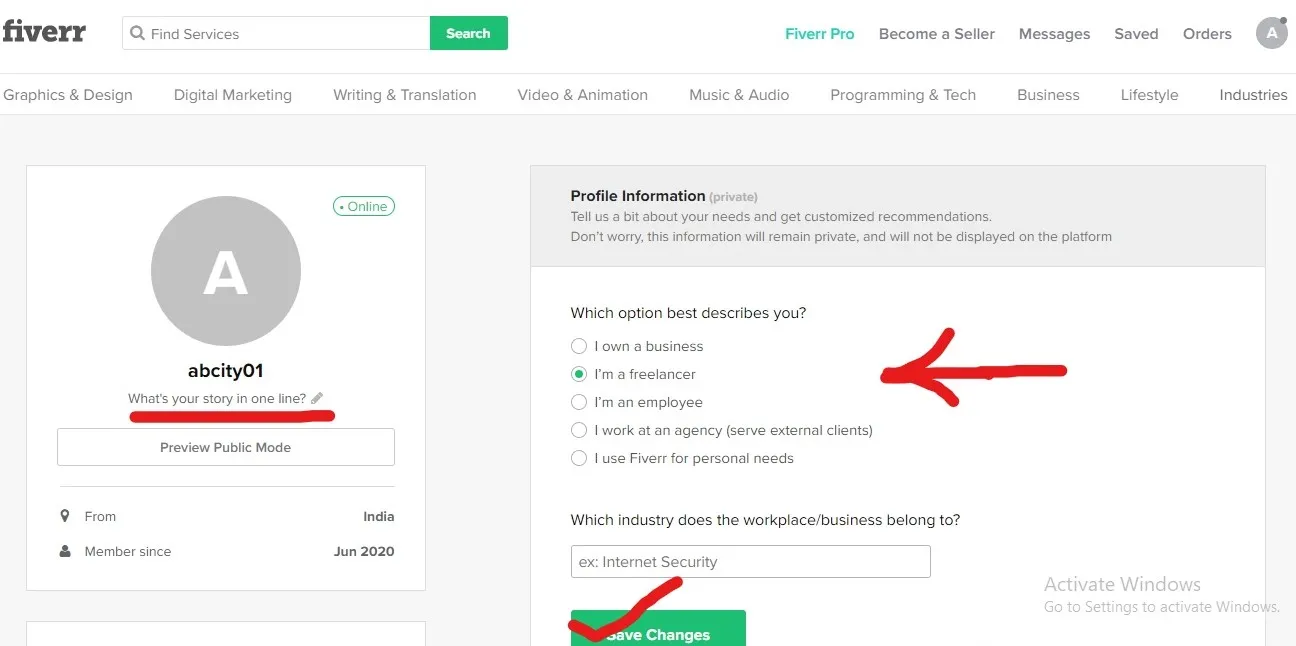
Step 5: Complete Your Profile
Congratulations! You’ve confirmed your email address, and now it's time to build out your profile. A complete profile is essential for attracting potential buyers and showcasing your skills. Think of it as your online business card — it’s the first impression you make!
Here’s a quick breakdown of the profile elements you’ll need to complete:
- Profile Picture: Upload a clear, professional-looking photo of yourself. People trust faces, so make sure it represents you well!
- Title: Create a concise and impactful title that describes your services. Something like “Expert Graphic Designer” or “Professional Writer” works well.
- Bio: Use this space to talk about your experience, skills, and what you can offer to potential clients. Keep it friendly and engaging, and aim for around 150-200 words.
- Skills: Add relevant skills that highlight your expertise. Fiverr allows you to select multiple skills, so choose wisely!
- Languages: Specify the languages you speak — this helps broaden your appeal to an international audience.
Once you've filled everything out, don’t forget to hit the Save button!
Completing your profile is more than just ticking boxes; it’s about representing yourself authentically to attract the right clients. As you build your profile, think about what makes you unique and how you can convey that effectively!
Also Read This: Best 10 Fiverr Gigs for Illustration in 2024
Step 6: Setting Up Payment Methods
Once you've created your Fiverr account and completed your profile, the next exciting step is setting up your payment methods. This is an essential part of ensuring you can receive payment for your services without a hitch. Here’s a simplified process to help you navigate through it:
- Access Payment Settings: Log in to your Fiverr account and click on your profile picture at the top right corner. A drop-down menu will appear; simply select “Settings.” From there, navigate to the “Billing” tab.
- Choose Your Payment Method: Fiverr offers several payment methods, including PayPal, bank transfers, and Fiverr Revenue Card. Each option has its benefits, so consider what works best for you.
- Link Your Account: If you opt for PayPal, you’ll need to provide your PayPal email address. For bank transfers, you’ll need to fill in your bank account details. Follow the prompts to connect and verify your account.
- Minimum Withdrawal Amount: Keep in mind that Fiverr has a minimum withdrawal threshold, which is generally $5. Make sure your earnings meet this amount before attempting to withdraw.
- Enable Two-Factor Authentication (Optional): For extra security, consider enabling two-factor authentication to protect your payment information and account.
Taking the time to properly set up your payment methods will save you potential headaches later on. Plus, it ensures that you can focus on what you do best: offering your services and growing your freelance business!
Also Read This: Can You Make a Living on Fiverr?
Tips for a Successful Fiverr Account
Building a successful Fiverr account goes beyond just signing up. You need to be proactive and strategic! Here are some valuable tips to help you thrive on this platform:
- Optimize Your Profile: Your profile is your digital storefront. Use a professional photo and write a compelling bio that highlights your skills and experience. Tailor your profile to match the services you offer.
- Create Unique Gig Packages: Offer different levels of service – basic, standard, and premium. This gives clients options and can help you cater your offerings to different budgets.
- Use Clear and Eye-Catching Titles: Make sure your gig titles are descriptive and include keywords that potential clients might search for. This can significantly improve your gig’s visibility.
- Set Competitive Prices: Research what others in your niche are charging to find a sweet spot for your prices. Initially, you might want to start lower to attract clients, then adjust as your reputation grows.
- Promote Your Gigs: Don't rely solely on Fiverr’s traffic. Share your gigs on social media platforms, blogs, or even through email newsletters to draw in more potential clients.
- Maintain Excellent Communication: Respond quickly to inquiries and maintain a friendly, professional tone. Great communication can lead to positive reviews, which can boost your credibility and attract more clients.
By following these tips, you’ll not only enhance your Fiverr profile but also position yourself for long-term success on the platform. Happy freelancing!
How to Register a Fiverr Account: A Step-by-Step Guide
Fiverr is a popular online marketplace that connects freelancers with clients looking for various services, from graphic design to programming and writing. Creating a Fiverr account is the first step to showcasing your skills and starting your freelance journey. Follow this simple, step-by-step guide to register your account and begin your Fiverr experience.
- Visit the Fiverr Website
Head over to www.fiverr.com using your web browser.
- Click on "Join"
Locate the "Join" button at the top right corner of the homepage and click it.
- Enter Your Details
You have the option to register with:
- Your email address
- Your Google account
- Your Facebook account
Choose your preferred method and provide the requested information.
- Choose a Username and Password
If you register through email, you’ll be prompted to create a username and password. Make sure to choose a strong password to secure your account.
- Agree to the Terms of Service
Read through Fiverr's terms of service and privacy policy. Be sure to check the box indicating you agree to them.
- Email Confirmation
After completing the registration form, check your email for a confirmation link. Click the link to verify your account.
- Complete Your Profile
Once your email is verified, log in to your account and complete your profile by adding items like:
- Your profile picture
- A description of your services
- Your skills and experience
Congratulations! You’ve successfully registered a Fiverr account. This is your first step towards building a successful freelancing career, so take time to optimize your profile and start exploring opportunities.
Conclusion: Registering a Fiverr account is a straightforward process that opens up a world of freelance opportunities. Follow these steps carefully, and you'll be well on your way to establishing your presence on this vibrant platform.